The Ultimate Arabic OCR Face-Off: Which AI Reads the Best?

We ran 9 solutions on the same Arabic business plan page. One stood above the rest. Here’s how they all compare.
- Setup & test document
- Nanonets-OCRs
- DeepSeek-OCR
- PaddleOCR-VL
- Qari-OCR
- HunyuanOCR
- Legacy tools: Tesseract, EasyOCR, ArabicOCR
- Baseer (winner 🏆)
- Full comparison
Setup & test document
All models were tested on the same image: a scanned page from an Arabic business plan (Ocr-Test.jpg), featuring a bilingual header ("خطة عمل المشروع / Business Plan"), a university logo, section headings, and a multi-column, right-to-left table with merged cells listing startup cost categories.
This is a realistic, challenging document, not a clean digital render. It mixes Arabic script with Latin text, contains a structured table, colspan and rowspan cells, and includes a graphical logo. Every model was asked to extract the content faithfully; some were given richer prompts to also return tables as HTML and flag images.

All VLM-based models were run via vLLM on an NVIDIA A100 40 GB GPU in a Google Colab environment. Baseer was called through its cloud API using the Kawn Python client.
Nanonets-OCRs
Nanonets-OCR-s is a document-extraction model built on top of Qwen2.5-VL. It accepts a rich prompt that instructs it to output tables as HTML, equations in LaTeX, flag watermarks, and describe embedded images. It is loaded with vLLM and called with a manually constructed chat template.
from PIL import Image

from vllm import LLM, SamplingParams

MODEL = "nanonets/Nanonets-OCR-s"

PROMPT = """Extract the text from the above document as if you were

reading it naturally. Return tables in html format. Return equations

in LaTeX. If there is an image, add a description inside <img></img>.

Watermarks: <watermark>TEXT</watermark>."""

img = Image.open("document.jpg").convert("RGB")

llm = LLM(

   model=MODEL,

   gpu_memory_utilization=0.95,

   max_model_len=8192,

   max_num_seqs=1,

   mm_processor_kwargs={"min_pixels": 28*28, "max_pixels": 1280*28*28},

   limit_mm_per_prompt={"image": 1},

   trust_remote_code=True,

)

prompt_text = (

   "<|im_start|>system\nYou are a helpful assistant.<|im_end|>\n"

   "<|im_start|>user\n<|vision_start|><|image_pad|><|vision_end|>"

   f"{PROMPT}<|im_end|>\n"

   "<|im_start|>assistant\n"

)

params = SamplingParams(

   max_tokens=8192, temperature=0, repetition_penalty=1.1,

   stop_token_ids=[151645, 151643],

)

output = llm.generate(

   [{"prompt": prompt_text, "multi_modal_data": {"image": img}}], params

)

print(output[0].outputs[0].text.strip())
output

DeepSeek-OCR
DeepSeek-ocr is a Mixture-of-Experts document model requiring a custom NGramPerReqLogitsProcessor from vLLM's model executor. Its prompt is deliberately minimal — just "Free OCR." — and it relies on the model's internal knowledge to structure the output.
from vllm import LLM, SamplingParams

from vllm.model_executor.models.deepseek_ocr import NGramPerReqLogitsProcessor

from PIL import Image

MODEL = "deepseek-ai/DeepSeek-OCR"

img   = Image.open("document.jpg").convert("RGB")

llm = LLM(

   model=MODEL,

   enable_prefix_caching=False,

   mm_processor_cache_gb=0,

   logits_processors=[NGramPerReqLogitsProcessor],

   limit_mm_per_prompt={"image": 1},

   trust_remote_code=True,

   max_model_len=8192,

   max_num_seqs=2,

)

params = SamplingParams(

   temperature=0.0, max_tokens=8192,

   skip_special_tokens=False,

   extra_args={

       "ngram_size": 30, "window_size": 90,

       "whitelist_token_ids": {128821, 128822},  # <bbox>, </bbox>

   },

)

output = llm.generate(

   [{"prompt": "<image>\nFree OCR.", "multi_modal_data": {"image": img}}],

   params,

)

print(output[0].outputs[0].text.strip())
output

The output was completely missed; it couldn’t produce the correct structure, and couldn’t output the other information on the page.
PaddleOCR-VL
PaddleOCR-VL is a lightweight (~2 B) vision-language model from Baidu PaddlePaddle. It uses a chat template applied via AutoTokenizer and accepts a very simple prompt: "OCR:". Its small size makes it attractive for resource-constrained deployments.
from transformers import AutoTokenizer

from vllm import LLM, SamplingParams

from PIL import Image

MODEL = "PaddlePaddle/PaddleOCR-VL"

img   = Image.open("document.jpg").convert("RGB")

llm = LLM(

   model=MODEL, trust_remote_code=True,

   max_model_len=4096, max_num_seqs=5,

   limit_mm_per_prompt={"image": 1},

   gpu_memory_utilization=0.95,

   enable_prefix_caching=False, mm_processor_cache_gb=0,

)

tokenizer = AutoTokenizer.from_pretrained(MODEL, trust_remote_code=True)

messages = [{"role": "user", "content": [

   {"type": "image"}, {"type": "text", "text": "OCR:"}

]}]

prompt_text = tokenizer.apply_chat_template(

   messages, tokenize=False, add_generation_prompt=True

)

params = SamplingParams(

   max_tokens=4096, temperature=0,

   repetition_penalty=1.1, stop_token_ids=[151645, 151643],

)

output = llm.generate(

   [{"prompt": prompt_text, "multi_modal_data": {"image": img}}], params

)

print(output[0].outputs[0].text.strip())
output

The output is flat plain text with no structure at all: no table, no heading hierarchy. Good for raw text extraction from simple layouts; not suitable when document structure matters.
Qari-OCR
Qari is an Arabic-first OCR model from NAMAA Space, fine-tuned specifically for Arabic document understanding on a Qwen2-VL 2 B base. Despite its small size, it outputs richly structured HTML — headings, bold/italic, and full table markup — making it one of the most output-aware models in this comparison.
from vllm import LLM, SamplingParams

from PIL import Image

MODEL  = "NAMAA-Space/Qari-OCR-v0.3-VL-2B-Instruct"

PROMPT = ("Below is the image of one page of a document, as well as "

         "some raw textual content that was previously extracted for it. "

         "Just return the plain text representation of this document as if "

         "you were reading it naturally. Do not hallucinate.")

img = Image.open("document.jpg").convert("RGB")

llm = LLM(

   model=MODEL,

   gpu_memory_utilization=0.95, max_model_len=8192, max_num_seqs=1,

   mm_processor_kwargs={"min_pixels": 28*28, "max_pixels": 1280*28*28},

   limit_mm_per_prompt={"image": 1}, trust_remote_code=True,

)

prompt_text = (

   "<|im_start|>system\nYou are a helpful assistant.<|im_end|>\n"

   "<|im_start|>user\n<|vision_start|><|image_pad|><|vision_end|>"

   f"{PROMPT}<|im_end|>\n"

   "<|im_start|>assistant\n"

)

params = SamplingParams(

   max_tokens=8192, temperature=0,

   repetition_penalty=1.1, stop_token_ids=[151645, 151643],

)

output = llm.generate(

   [{"prompt": prompt_text, "multi_modal_data": {"image": img}}], params

)

print(output[0].outputs[0].text.strip()
output

It completely ignores the first table; it collapsed the table’s multi-row header into a single flat row the merged-cell structure was lost.
HunyuanOCR
HunyuanOCR from Tencent supports a generous 16 384 token context window and uses an AutoProcessor with a chat template. It outputs structured HTML including proper table markup and handles images. The long warmup time (nearly a minute to initialize) is its main downside.
from transformers import AutoProcessor

from vllm import LLM, SamplingParams

from PIL import Image

MODEL  = "tencent/HunyuanOCR"

PROMPT = ("Extract the text from the above document as if you were reading "

         "it naturally. Return tables in html format. If there is an image "

         "wrap it as <img>image here</img>. Watermarks: "

         "<watermark>TEXT</watermark>.")

img = Image.open("document.jpg").convert("RGB")

llm = LLM(

   model=MODEL, trust_remote_code=True,

   gpu_memory_utilization=0.90,

   max_model_len=16384, limit_mm_per_prompt={"image": 1},

)

processor = AutoProcessor.from_pretrained(MODEL, trust_remote_code=True)

messages = [

   {"role": "system", "content": ""},

   {"role": "user", "content": [

       {"type": "image"}, {"type": "text", "text": PROMPT}

   ]}

]

prompt_text = processor.apply_chat_template(

   messages, tokenize=False, add_generation_prompt=True

)

params = SamplingParams(

   max_tokens=16384, temperature=0, repetition_penalty=1.1,

)

output = llm.generate(

   [{"prompt": prompt_text, "multi_modal_data": {"image": img}}], params

)

print(output[0].outputs[0].text.strip())
output
The model did very well, but still has mistakes with the number of rows of tables, leading to an error with the output text
Legacy tools: Tesseract, EasyOCR, and ArabicOCR
For completeness, we also tested three traditional (non-VLM) OCR tools. The results were poor across the board on this document, and the gap with the VLM-based models was stark.
Tesseract (both via pytesseract and via PyMuPDF's get_textpage_ocr) produced garbled output with significant character errors, mixed RTL ordering problems, and no structure whatsoever. Examples of actual output: "ات+ا27خطة عمل المشروع" and "51دمجا\" ددعدرةدب8" — noise that would be unusable in any downstream task.
EasyOCR did better on isolated words but still failed on the table. It extracted word fragments out of order ("فات السابقة للتشغيل" instead of "المصروفات السابقة للتشغيل") and had no awareness of the document's two-column, RTL table structure.
ArabicOCR — a wrapper around EasyOCR tuned for Arabic — produced somewhat more complete word-level detections with confidence scores, but suffered from the same structural blindness. It also ran on CPU only in our environment, making it significantly slower.
Baseer
🏆 Best Arabic OCR
Baseer (بصير) is a specialized Arabic OCR model developed by Kawn.ai. Unlike the other models in this comparison, Baseer is purpose-built for Arabic document understanding — not a general-purpose VLM fine-tuned on OCR data. You interact with it through the kawn Python library, which handles file upload, job queuing, and result retrieval automatically. It supports both images and PDFs.
What makes Baseer stand out is not just accuracy — it’s that the output is immediately usable. Tables arrive with correct HTML structure, Arabic text is perfectly ordered right-to-left, images are flagged with [IMAGE], and formatting cues like bold headings are preserved with Markdown-style markup.
How to use it
# Install the client

# pip install kawn.ai

import os

from kawn import KawnClient

from kawn.services import OCRService

# Set your API key (or pass directly to KawnClient)

os.environ["MISRAJ_API_KEY"] = "your_api_key_here"

client      = KawnClient(os.environ["MISRAJ_API_KEY"])

ocr_service = OCRService(client)

# Process an image or PDF - it's one call

result = ocr_service.process_file(file_path="document.jpg")

# result.pages is a list of OCRPage objects

for page in result.pages:

   print(f"--- Page {page.index} ---")

   print(page.content)
That’s it. No GPU required, no vLLM setup, no chat template construction. The process_file call uploads the document, polls for the result, and returns a structured response. You can also pass a URL instead of a file path.
Output

Why Baseer wins: It is the only model that produced a fully correct, semantically valid HTML table, including proper <thead>/<tbody> separation and accuracy rowspan/colspan on the two-tier merged header. It correctly flagged the logo as[IMAGE], preserved bold formatting on section headings, and maintained perfect Arabic text order throughout. And it required zero GPU infrastructure.
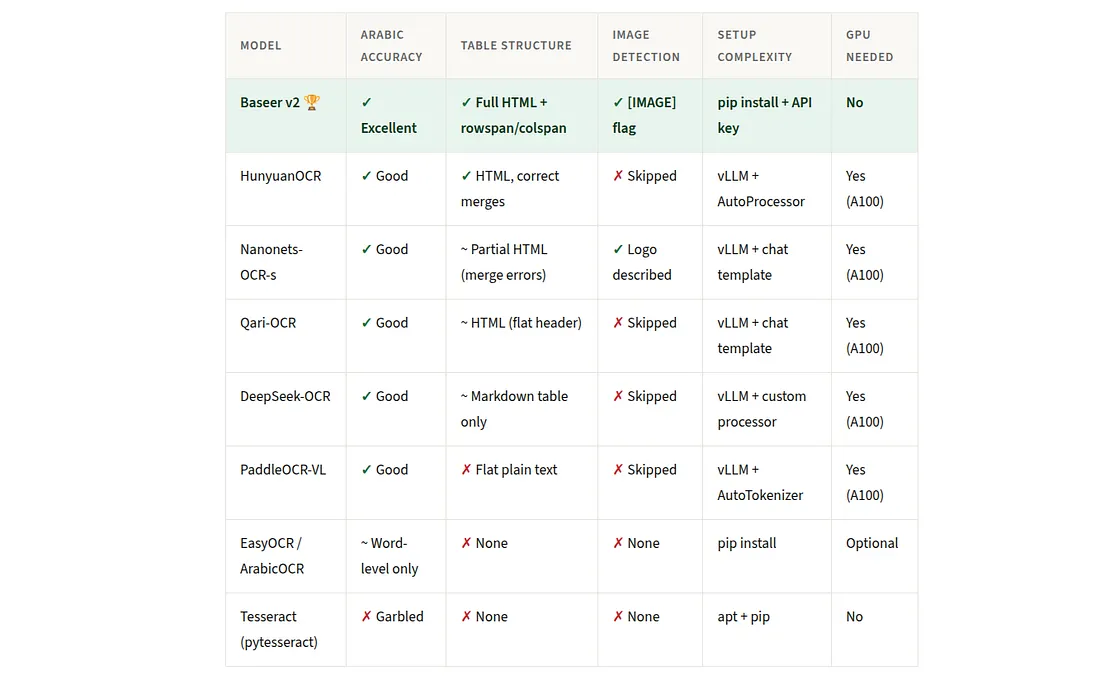
Full comparison
Conclusion
For Arabic document OCR in 2026, the VLM-based models have left traditional tools far behind. But even among the VLMs, there’s a meaningful quality gap, and Baseer sits at the top of it.
Baseer is the only model that consistently produced semantically valid HTML tables with correct merged-cell structure, proper heading formatting, and image detection — while requiring no GPU and only a simple pip install. If you’re building an Arabic document pipeline today, it’s the obvious starting point.
If you need an on-premise, self-hosted solution, HunyuanOCR is the strongest alternative. For resource-constrained environments, Qari’s 2 B parameter model punches well above its weight. And if you need raw text only, PaddleOCR-VL keeps things simple.
Tesseract and its derivatives remain useful for simple Latin-script tasks but for Arabic, especially with tables, they are not a viable option in 2026.